Purchase Entry
Prepare the purchase transaction from the bill data.
Snap a photo or upload a vendor bill. BusinessBook Plus AI reads the document, prepares the purchase entry, identifies vendor and item information, and helps keep stock and accounting records connected.
This is more than purchase bill OCR. The goal is not simply to extract text from an invoice. It is to turn the document into a usable business transaction.
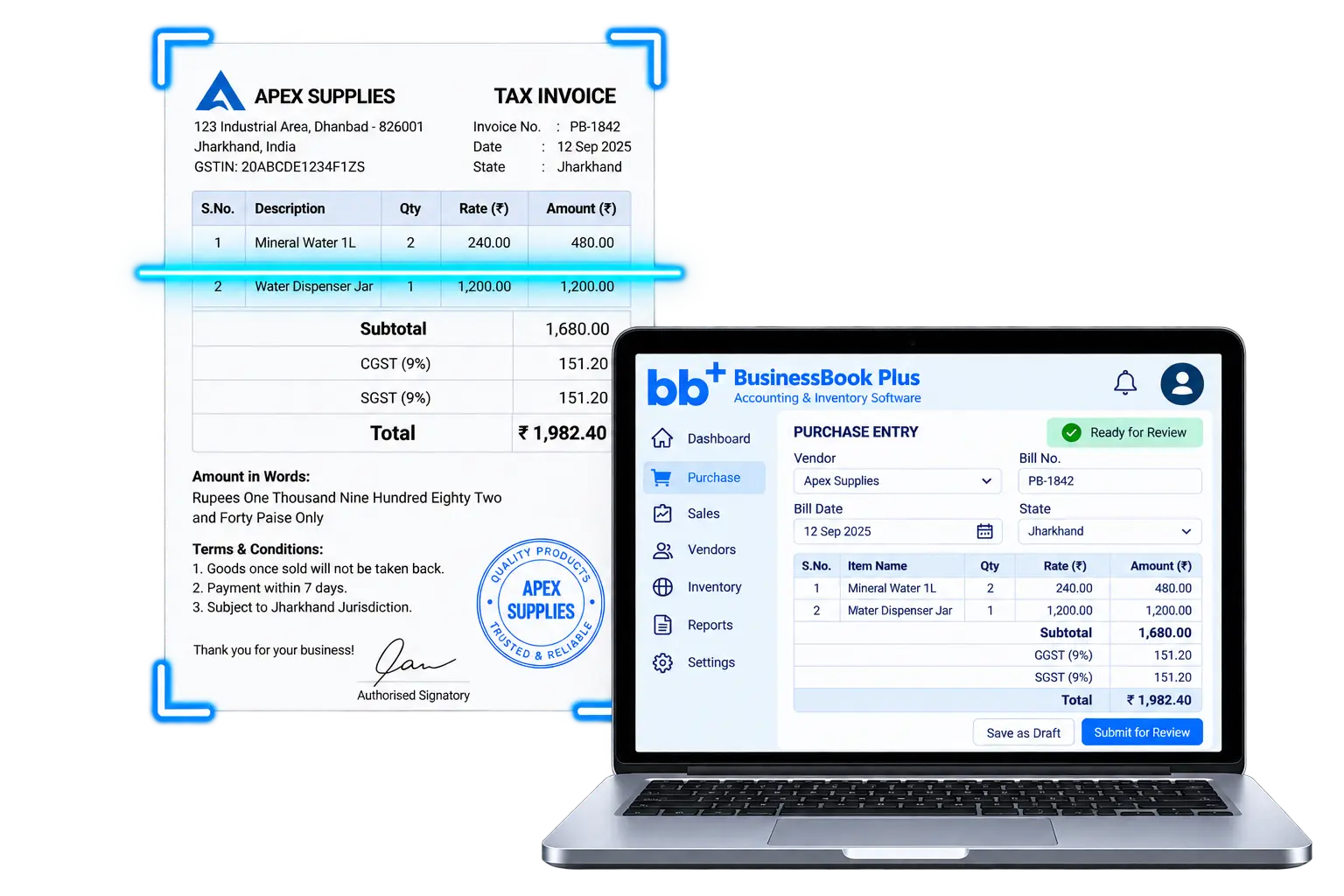
Traditional invoice OCR focuses on extracting fields from a document. BusinessBook Plus is designed to carry that information into the purchase workflow so the scanned bill can become part of inventory and accounting operations.
Photo, image, or uploaded bill becomes the starting point.

Prepare the purchase transaction from the bill data.
Create or connect vendor and item records where required.
Reflect purchased stock in inventory records.
Keep the purchase connected with accounting records.
The AI Purchase Bill Scanner follows a practical business workflow rather than stopping after text extraction.
Take a photo or upload the vendor bill.
Extract vendor, item, quantity, amount, and bill information.
Review the detected information before it becomes a transaction.
Turn reviewed document data into the purchase record.
Connect vendor, items, stock, and accounting.
Instead of typing bill data manually, AI helps identify relevant purchase information from the uploaded document and places it into a structured review workflow.
Identify the supplier or vendor shown on the bill.
Capture invoice or bill number, date, and transaction information.
Read item descriptions from purchase lines.
Capture quantities, rates, and purchase amounts.
Identify applicable tax details available on the document.
Prepare the purchase total for review and transaction creation.
Document quality and vendor formats can vary. The review step keeps the business user in control before the purchase entry affects stock and accounting records.
When the scanned bill includes a vendor or item that is not yet available in your business records, the purchase workflow can help add the required master data instead of forcing you to leave the transaction and set it up separately.
The bill contains business information that may not yet exist in the system.
Prepare a vendor record when the supplier is new.
Prepare item information when a purchased item is new.
Use existing vendor and item records where a match is available.
The value of automated purchase entry comes from what happens after the bill is scanned. Once reviewed and created, the purchase can continue into the operational records that depend on it.
The scanned vendor bill becomes a structured purchase transaction.
Purchased stock can update inventory quantities.
Keep the amount due to the vendor connected with the purchase.
Carry the purchase into connected accounting records.
Reflect the transaction in relevant business and financial reporting.
Purchase bill scanning can reduce repetitive data entry for businesses receiving vendor invoices throughout the day.
Scan supplier bills and prepare inventory-related purchases faster.
Reduce manual entry across larger vendor and item purchases.
Speed up recurring purchase entry from familiar suppliers.
Use detected bill information to help create missing business records.
Keep purchase creation connected with stock movement.
Reduce the gap between bill receipt and accounting entry.
AI can accelerate bill reading and transaction preparation, but business users remain responsible for reviewing the information before it affects purchase, stock, and accounting records.
Common questions about purchase bill scanning, invoice OCR, automated purchase entry, and connected inventory and accounting workflows.
An AI Purchase Bill Scanner reads information from a vendor bill or purchase invoice and helps prepare structured purchase data so the transaction does not need to be entered completely by hand.
Yes. BusinessBook Plus helps organize GST-related sales, purchases, input tax, and output tax information so your accountant can review and prepare filings more efficiently.
Yes. BusinessBook Plus is designed to take the scanned or uploaded vendor bill through AI reading, review, and purchase-entry preparation rather than stopping at OCR extraction.
The workflow can help create required vendor and item master records when the scanned purchase includes business information that is not already available.
For inventory-related purchases, the purchase workflow can keep purchased quantities connected with inventory records after the reviewed transaction is created.
No. OCR is one part of the workflow. The broader goal is to move from document reading to purchase transaction creation, master-data handling, inventory update, and connected accounting.
Yes. The page is designed around a review step so the business user can check detected information before the purchase transaction affects operational records.
Scan vendor bills, review the extracted information, create purchase entries, and keep inventory and accounting connected.